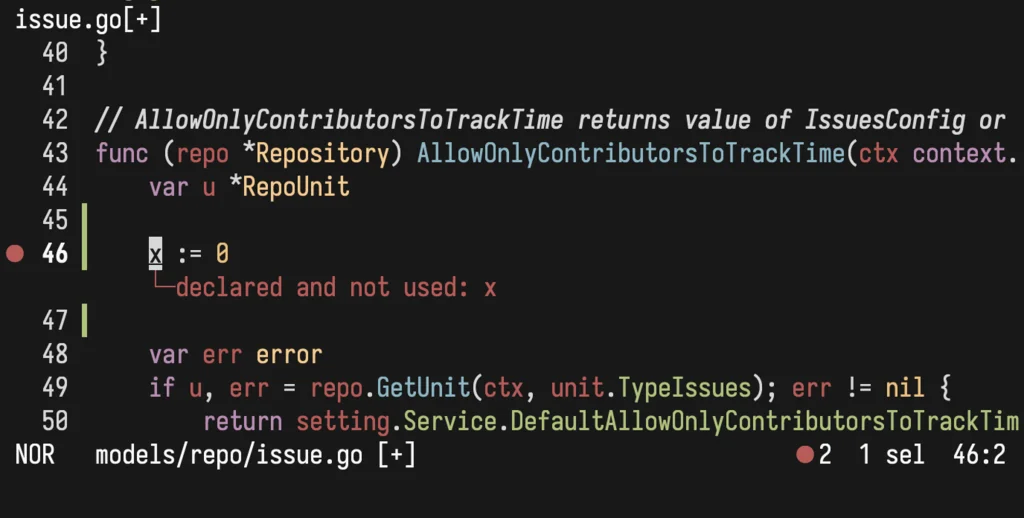
Since getting my Forgejo dev environment running I’ve begun poking around the issue backlog and learning my way around the code, looking for the stepping stones to becoming a contributor. One important early milestone was to get the Golang LSP running in Helix.
You can always check if Helix’s LSP integration for a given language is ready by
using hx --health.
$ hx --health go
Configured language servers:
  ✘ gopls: 'gopls' not found in $PATH
  ✘ golangci-lint-lsp: 'golangci-lint-langserver' not found in $PATH
Configured debug adapter:
  ✘ 'dlv' not found in $PATH
Configured formatter: None
Tree-sitter parser: ✓
Highlight queries: ✓
Textobject queries: ✓
Indent queries: ✓
Those ✘ symbols are bad news! Installing those missing tools looked like this.
go install golang.org/x/tools/gopls@latest
go install github.com/nametake/golangci-lint-langserver@latest
go install github.com/go-delve/delve/cmd/dlv@latest
brew install golangci-lint
That last brew install there is good to know about. You’ll get ✓✓✓ from
hx --health without it, but linting won’t actually work, and instead there’s
an error about exec: "golangci-lint": executable not found in $PATH.
Then there was one last little trick necessary. Those things that go install
downloaded live in ~/go/bin, which isn’t in $PATH. I threw a Fish plugin at
the problem, like this.
fisher install halostatue/fish-go@v2
After that, I had ✓ across the board.
$ hx --health go
Configured language servers:
  ✓ gopls: /Users/henrycatalinismith/go/bin/gopls
  ✓ golangci-lint-lsp: /Users/henrycatalinismith/go/bin/golangci-lint-langserver
Configured debug adapter:
  ✓ /Users/henrycatalinismith/go/bin/dlv
Configured formatter: None
Tree-sitter parser: ✓
Highlight queries: ✓
Textobject queries: ✓
Indent queries: ✓
Here’s Helix in action with the tooling integrated, successfully detecting a linter error resulting from an unused variable.